Showing posts with label API. Show all posts

Wednesday, 11 June 2025

A Replacement for my PositionBook Charts using Tick Volumes?

At the end of my previous post I said that I would be looking into using tick volume to create a new indicator, and this post is about the work I have done on this idea.

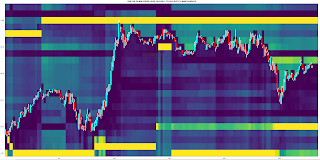
At first I tried creating a more traditional type of indicator using tick volumes separated out into buy and sell volumes, but I quickly felt that this was not a useful investment of my time so I gave up on this idea. Instead, I have come up with a way to plot tick volume levels that are similar to my previously discussed positionbook chart type, which I was forced to give up on because Oanda have discontinued the API endpoint for downloading the required data. An example of the the new, tick volume equivalent is shown below, followed by a brief description of the methodology used to create it.

Starting with the basics, if we imagine a Doji bar, for every up (down) tick there must be a corresponding and opposing down (up) tick for the bar to open and close at the exact same price and therefore we can split the tick volume for the bar equally between buy and sell tick volumes. Similarly, if we imagine a bar that opens on the low (high) and closes on the high (low), the number of ticks within the entire bar tick range can be ascribed to buy (sell) volume and the balance divided between buy and sell.

e.g. a bar opens at the low , closes at the high, with a tick range of 10 and total tick volume of 50 then:

  • buy tick volume = 10 + ( 50 - 10)/2 = 30
  • sell tick volume = 50 - buy tick volume = 20

This idea can be generalised to the range of a candlestick body being appropriately allocated to buy or sell tick volume, with the remaining balance of the total bar volume being equally allocated to buy and sell. OK, so far so good, and nothing particularly ground breaking. For the want of explaining it in a more precise manner, using the "geometry" of a bar to allocate buy and sell volumes is something that can be found online in the formulation of more than a few indicators.

The next step step is to "smear" these buy and sell volumes equally across the whole range of the bar and then take the difference:

e.g. "smeared" buy - "smeared" sell = 30 / 10 - 20 / 10 = 1, thus allocate a tick difference value of +1 for each tick level within the 10 tick range of the bar. 

Of course, over a large (e.g. 10 minute bar) this wouldn't necessarily be very informative as it is known (my volume profile bars) that the volume is usually unevenly spread across the range of any given bar. The solution to this is to apply the above methodology to the smallest bar possible, and with Oanda the smallest possible bar download is a 5 second bar. Thus what I have done is apply the above to each 5 second bar within a given 10 minute bar period and then accumulate the buy/sell/tick difference values across the individual tick levels within the 10 minute bar. This gives tick differences values that approximate the differences between each bar's separate buy and sell volume profiles.

The final step is to volume normalise the above calculations by using the total 10 minute bar tick volume such that tick differences within bars that have higher total tick volume have a greater weight than those in low tick volume bars. This is simply done by setting the total bar volume as the numerator and the tick difference as the denominator:

e.g. a tick difference of 2 at a tick level within a bar with a total 10 tick volume will get the weight

  •  10 / 2 = 5

whilst the same tick difference in a 50 tick volume bar will get the weight

  • 50 / 2 = 25
Finally, all the above is plotted as the backgound heatmap to a candlestick chart, but with a slight twist - exponential forgetting is applied along each individual tick level within the y-axis range such that if an individual tick level only has one price bar spanning it the colour slowly fades as we move along the x-axis, whilst if this level is revisited, just as with an exponential moving average, the more recent data is accumulatively weighted more. For the above plot the exponential alpha value is set at the equivalent of a 144 bar exponential moving average, i.e. the number of 10 minute bars in a 24 hour period. Shorter moving average equivalents just increase the speed at which the forgetting takes place, leading to shorter lines extending to the right, but accentuate the differences between levels; e.g. the following is the same plot as above with the equivalent of a 14 bar exponential moving average alpha value.

Earlier in this post I alluded to the possibility of this type of tick difference chart being a replacement for my unwillingly and forcefully retired PositionBook chart type. The similarities/equivalences between the two chart types I now discuss:

With the old PositionBook (PB) chart, traders' net positions at any given level and at 20 minute snapshot frequency were explicitly given by API data download and changes between snapshots were inferred by an optimisation routine. With these new TickDifference (TD) charts, traders' net positions are inferred via the methodology described above, i.e. higher normalised tick volumes at different tick levels imply a higher, net trader positioning at these levels, and changes over time in this positioning are approximated by the exponential forgetting factor.

In terms of plotting, both in the PB and TD charts, the intensities of the colours (blue for longs and red for shorts) reflect the relative importances of long/short positioning at different levels: the greater the intensity, the greater the difference between long and short positioning.

I shall now enter into a period of observational study of the usefulness of this chart type because, as the chart is inherently visual, I can't imagine how I could effectively test it in a more traditional, back testing manner. If any reader could suggest how this more traditional approach might be done, I'm all ears.    


Friday, 27 September 2024

Discontinuation of Oanda's OrderBook and PositionBook Endpoints via the V20 Framework

Longtime readers of this blog are almost certainly aware that over the last few years I have posted several times about Oanda's OrderBook and PositionBook data and what can be done with it. My first post was back in February 2022 where I posited the idea of using this data as a sentiment indicator, whilst my most recent post, March 2024, talked about substituting the data into standard, volume based indicators. In between these two dates I blogged about using the data as features for machine learning (here and here), different methods of plotting it (here with example trade and here) and an improved, associated optimisation method here.

Researching and posting about this has been interesting and I was quietly confident that there was some real value to be found doing this. However, I have recently been unpleasantly surprised and disappointed to learn (by way of my API cronjob downloading routines suddenly failing) that Oanda has decided to no longer make available the ability to download this data via their V20 API Framework. So, at a stroke, all of the above work has suddenly become redundant and effectively useless for back testing purposes or for future trading purposes. 

Did I say I was disappointed? Well, that understates it somewhat! I have written to Oanda to express my displeasure at this recent change and perhaps, fingers crossed, they will reinstate this V20 functionality.

Friday, 24 May 2024

Using Oanda's API to Place Entry Orders

Since my last post about end of initial testing I have been working on Oanda API functions in Octave to programmatically place entry orders and associated take profit and stop orders for a future possible forex news trading system. The reason for this is simple - it would be next to impossible to manually place a series of entry orders in the last few moments before a news release, so this would have to be done automatically. To this end, I have spent the last few weeks writing a few simple entry functions and testing them in my live trading account with the minimum trading size, i.e. buying and selling 1 Euro in the EURUSD forex pair and observing the subsequent lines at the entry/stop/take profit levels that appear on the live web platform.

The basic schema for this is shown in the following code box, where it can be seen that

body = jsonencode( struct( 'order' , struct( 'units' , num2str( 1 ) , ...
                                              'instrument' , 'EUR_USD' , ...
                                              'timeInForce' , 'FOK' , ...
                                              'type' , 'MARKET' , ...
                                              'trailingStopLossOnFill' , struct( 'distance' , num2str( trail_distance ) , ...
                                                                                  'timeInForce' , 'GTC' , ...
                                                                                  'triggerCondition' , 'MID' ) , ...
                                              'positionFill' , 'DEFAULT' ) ) )

account_header = ['curl -X POST -H "Content-Type: application/json" -H "Authorization: Bearer TOKEN"'] ;

submit_order = [ account_header , ' "https://api-fxtrade.oanda.com/v3/accounts/ACCOUNT/orders"' , ' -d ' , "'" , body , "'" ] ;

[ ~ , ret_JSON ] = system( submit_order , RETURN_OUTPUT = 'TRUE' ) ;

a JSON object containing the order details is created, HTML headers with account information are added, and then the order is dispatched via a system call to the cURL library.

A more complete Octave function example is shown next. This is a buy on a stop entry function which also sets a stop loss and take profit target level on being filled, and there is also some basic input checking.

function [ ret_JSON ] = buy_stop_entry_with_stoploss_and_takeprofit( cross , no_of_units , entry_price_level , stop_level , take_profit_level )

## some basic checks
if ( entry_price_level <= stop_level )
   error( 'Stop Level is not below Entry Level.' ) ;
endif

if ( entry_price_level >= take_profit_level )
   error( 'Take Profit Level is not above Entry Level.' ) ;
endif

account_header = ['curl -X POST -H "Content-Type: application/json" -H "Authorization: Bearer TOKEN"'] ;

body = jsonencode( struct( 'order' , struct( 'type' , 'STOP' , ...
                                              'instrument' , toupper( cross ) , ...
                                              'units' , num2str( abs( no_of_units ) ) , ...
                                              'price' , num2str( entry_price_level ) , ...
                                              'stopLossOnFill' , struct( 'price' , num2str( stop_level ) , ...
                                                                         'timeInForce' , 'GTC' ) , ...
                                              'takeProfitOnFill' , struct( 'price' , num2str( take_profit_level ) ) , ...
                                              'timeInForce' , 'GTC' , ...
                                              'triggerCondition' , 'MID' , ...
                                              'positionFill' , 'DEFAULT' ) ) ) ;

submit_order = [ account_header , ' -d ' , "'" , body , "'" , ' "https://api-fxtrade.oanda.com/v3/accounts/ACCOUNT/orders"' ] ;

[ ~ , ret_JSON ] = system( submit_order , RETURN_OUTPUT = 'TRUE' ) ;

ret_JSON = jsondecode( ret_JSON ) ;

endfunction

I won't spend much time explaining the contents of the JSON body as readers can find more information about this in Oanda's online documentation, however, there is one important thing I would note here and that is the key/value pair

 'triggerCondition' , 'MID'

The 'default' value for this is the bid/ask price for sells/buys which, in the case of a news trading system, could be problematic because the spread may very well be widened prior to a news release and trigger an entry without the underlying price actually having moved to the entry level, or even before the news is released. By setting the trigger condition to 'MID' a trade will be entered when the mid-price hits the entry level. The trade-off in this choice is summarised thus:

  • if the 'default' value is used, entries on "good" trades will be much closer to the entry level, on average, but at the possible expense of far more false entries and therefore losing trades, versus:
  • if the 'MID' value is used, there will possibly be fewer false entries, but at the expense of a worse entry price for "good" trades.
 This is a trade-off that will have to be investigated/tested in due course.

Friday, 11 November 2022

A New PositionBook Chart Type

It has been almost 6 months since I last posted, due to working on a house renovation. However, I have still been thinking about/working on stuff, particularly on analysis of open position ratios. I had tried using this data as features for machine learning, but my thinking has evolved somewhat and I have reduced my ambition/expectation for this type of data.

Before I get into this I'd like to mention Trader Dale (I have no affiliation with him) as I have recently been following his volume profile set-ups, a screenshot of one being shown below.

This shows recent Wednesday action in the EUR_GBP pair on a 30 minute chart. The flexible volume profile set-up Trader Dale describes is called a Volume Accumulation Set-up which occurs immediately prior to a big break (in this case up). The whole premise of this particular set-up is that the volume accumulation area will be future support, off of which price will bounce, as shown by the "hand drawn" lines. Below is shown my version of the above chart
with a bit of extra price action included. The horizontal yellow lines show the support area.

Now here is the same data, but in what I'm calling a PositionBook chart, which uses Oanda's Position Level data downloaded via their API.

The blue (red) horizontal lines show the levels at which traders are net long (short) in terms of positions actually entered/held. The brighter the colours the greater the difference between the longs/shorts. It is obvious that the volume accumulation set-up area is showing a net accumulation of long positions and this is an indication of the direction of the anticipated breakout long before it happens. The Trader Dale set-up presumes an accumulation of longs because of the resultant breakout direction and doesn't seem to provide an opportunity to participate in the breakout itself!

The next chart shows the action of the following day and a bit where the price does indeed come back down to the "support" area but doesn't result in an immediate bounce off the support level. The following order level chart perhaps shows why there was no bounce - the relative absence of open orders at that level.

The equivalent PositionBook chart, including a bit more price action,
shows that after price fails to bounce off the support level it does recover back into it and then even more long positions are accumulated (the darker blue shade) at the support level during the London open, again allowing one to position oneself for the ensuing rise during the London morning session, followed by another long accumulation during the New York opening session for a following leg up into the London close (the last vertical red line).

This purpose of this post is not to criticise the Trader Dale set-up but rather to highlight the potential value-add of these new PositionBook charts. They seem to hold promise for indicating price direction and I intend to continue investigating/improving them in the coming weeks.

More in due course.

Friday, 25 March 2022

OrderBook and PositionBook Features

In my previous post I talked about how I planned to use constrained optimization to create features from Oanda's OrderBook and PositionBook data, which can be downloaded via their API. In addition to this I have also created a set of features based on the idea of Order Flow Imbalance (OFI), a nice exposition of which is given in this blog post along with a numerical example of how to calculate OFI. Of course Oanda's OrderBook/PositionBook data is not exactly the same as a conventional limit order book, but I thought they are similar enough to investigate using OFI on them. The result of these investigations is shown in the animated GIF below.

This shows the output from using the R Boruta package to check for the feature relevance of OFI levels to a depth of 20 of both the OrderBook and PositionBook to classify the sign of the log return of price over the periods detailed below following an OrderBook/PositionBook update (the granularity at which the OrderBook/PositionBook data can be updated is 20 minutes):

  • 20 minutes
  • 40 minutes
  • 60 minutes
  • the 20 minutes starting 20 minutes in the future
  • the 20 minutes starting 40 minutes in the future
for both the OrderBook and PositionBook, giving a total of 10 separate images/results in the above GIF.
 
Observant readers may notice that in the GIF there are 42 features being checked, but only an OFI depth of 20. The reason for this is that the data contain information about buys/sell orders and long/short positions both above and below the current price, so what I did was calculate OFI for:
  • buy orders above price vs sell orders below price
  • sell orders above price vs buy orders below price
  • long positions above price vs short positions below price
  • short positions above price vs long positions below price 
As can be seen, almost all features are deemed to be relevant with the exception of 3 OFI levels rejected (red candles) and 2 deemed tentative (yellow candles).

It is my intention to use these features in a machine learning model to classify the probability of future market direction over the time frames mentioned above. 

More in due course.

Tuesday, 4 January 2022

Matrix Profile and Weakly Labelled Data - 2nd and Final Update

It has been over three months since my last post, which was intended to be the first in a series of posts on the subject of the title of this post. However, it turned out that the results of my work were underwhelming and so I decided to stop flogging a dead horse and move onto other things. I still have some ideas for using Matrix Profile, but not for the above. These ideas may be the subject of a future blog post.

I subsequently looked at plotting order levels using the data that is available via the Oanda API and I have come up with Octave code to render plots such as this:

where the brighter yellow stripes show ranges where there is an accumulation of sell/buy orders above/below price. These can be interpreted as support/resistance areas. It is normally my practice to post my Octave code, but the code for this plot is quite idiosyncratic and depends very much on the way I have chosen to store the underlying data downloaded from Oanda. As such, I don't think it would be helpful to readers and so I am not posting the code. That said, if there is actually a demand I am more than happy to make it available in a future blog post.

Having done this, it seemed natural to extend it to Open Position Ratios which are also available via the Oanda API. Plotting these levels renders plots that are similar to the plot shown above, but show levels where open long/short positions instead of open orders are accumulated. Although such plots are visually informative, I prefer something more objective, and so for the last few weeks I have been working on using the open position ratios data to construct some sort of sentiment indicator that hopefully could give a heads up to future price movement direction. This is still very much a work in progress which I shall post about if there are noteworthy results.

More in due course.

Saturday, 6 June 2020

Downloading FX Pairs via Oanda API to Calculate Currency Strength Indicator

In the past I have posted a series of blog posts about a Currency Strength Indicator (here, here, here and here). This blog post gives an Octave function to use Oanda's API to download all the 10 minute OHLC data required to calculate the above strength indicators on the 10 minute time frame.
## Copyright (C) 2020 dekalog
## 
## This program is free software: you can redistribute it and/or modify it
## under the terms of the GNU General Public License as published by
## the Free Software Foundation, either version 3 of the License, or
## (at your option) any later version.
## 
## This program is distributed in the hope that it will be useful, but
## WITHOUT ANY WARRANTY; without even the implied warranty of
## MERCHANTABILITY or FITNESS FOR A PARTICULAR PURPOSE.  See the
## GNU General Public License for more details.
## 
## You should have received a copy of the GNU General Public License
## along with this program.  If not, see
## .

## -*- texinfo -*- 
## @deftypefn {} {@var{retval} =} get_currency_index_10m_pairs()
##
## This function gets the date and time value of the last currency index update for
## 10 minute bars by reading the last line of the file at:
##
## "/home/path/to/file"
##
## and then downloads all the currencies required to calculate new values for
## new currency index calculations, via looped Oanda API calls. 
## 
##The RETVAL is a matrix of GMT dates in the form
## YYYY:MM:DD:HH:MM in the first 5 columns, followed by the 45 required
## currency candlestick close values.
##
## @seealso{}
## @end deftypefn

## Author: dekalog 
## Created: 2020-06-01

function retval = get_currency_index_10m_pairs()
 
## cell array of currency crosses to iterrate over to get the complete set 
## of currency crosses to create a currency index
iter_vec = {'AUD_CAD','AUD_CHF','AUD_HKD','AUD_JPY','AUD_NZD','AUD_SGD',...
'AUD_USD','CAD_CHF','CAD_HKD','CAD_JPY','CAD_SGD','CHF_HKD','CHF_JPY',...
'EUR_AUD','EUR_CAD','EUR_CHF','EUR_GBP','EUR_HKD','EUR_JPY','EUR_NZD',...
'EUR_SGD','EUR_USD','GBP_AUD','GBP_CAD','GBP_CHF','GBP_HKD','GBP_JPY',...
'GBP_NZD','GBP_SGD','GBP_USD','HKD_JPY','NZD_CAD','NZD_CHF','NZD_HKD',...
'NZD_JPY','NZD_SGD','NZD_USD','SGD_CHF','SGD_HKD','SGD_JPY','USD_CAD',...
'USD_CHF','USD_HKD','USD_JPY','USD_SGD'} ;

## read last line of current 10min_currency_indices
unix_command = [ "tail -1" , " " , "/home/path/to/file" ] ;
[ ~ , data ] = system( unix_command ) ;
data = strsplit( data , ',' ) ; ## gives a cell arrayfun of characters
## zero pad singular month representations, i.e. 1 to 01
if ( numel( data{ 2 } == 1 ) )
data{ 2 } = [ '0' , data{ 2 } ] ;
endif
## and also zero pad singular dates
if ( numel( data{ 3 } == 1 ) )
data{ 3 } = [ '0' , data{ 3 } ] ;
endif
## and also zero pad singular hours
if ( numel( data{ 4 } == 1 ) )
data{ 4 } = [ '0' , data{ 4 } ] ;
endif
## and also zero pad singular minutes
if ( numel( data{ 5 } == 1 ) )
data{ 5 } = [ '0' , data{ 5 } ] ;
endif
 
## set up the headers
Hquery = [ 'curl -s -H "Content-Type: application/json"' ] ; ## -s is silent mode for Curl for no paging to terminal
Hquery = [ Hquery , ' -H "Authorization: Bearer XXXXXXXXXXXXXXXXXXXXXXXXXXXXXXXXXXXXXXXXXXXXXXXXXXXXXXXXXXXXX"' ] ;
query_begin = [ Hquery , ' "https://api-fxtrade.oanda.com/v3/instruments/' ] ;

## get time from last line of data
query_time = [ data{1} , '-' , data{2} , '-' , data{3} , 'T' , data{4} , '%3A' , data{5} , '%3A00.000000000Z&granularity=M10"' ] ;

## initialise with AUD_CAD
## construct the API call for particular cross
query = [ query_begin , iter_vec{ 1 } , '/candles?includeFirst=true&price=M&from=' , query_time ] ;
## call to use external Unix systems/Curl and return result
[ ~ , ret_JSON ] = system( query , RETURN_OUTPUT = 'TRUE' ) ;
## convert the returned JSON object to Octave structure
S = load_json( ret_JSON ) ;
## parse the returned structure S
if ( strcmp( fieldnames( S( 1 ) ) , 'errorMessage' ) == 0 ) ## no errorMessage in S
end_ix = numel( S.candles ) ; ## how many candles?
if ( S.candles{ end }.complete == 0 ) end_ix = end_ix - 1 ; endif ## account for incomplete candles
## create retval
retval = zeros( end_ix , 50 ) ; ## 45 currencies plus YYYY:MM:DD:HH:MM columns
for ii = 1 : end_ix
 date_time = strsplit( S.candles{ ii }.time , { '-' , 'T' , ':' } ) ;
 retval( ii , 1 ) = str2double( date_time( 1 , 1 ) ) ; ## year
 retval( ii , 2 ) = str2double( date_time( 1 , 2 ) ) ; ## month
 retval( ii , 3 ) = str2double( date_time( 1 , 3 ) ) ; ## day
 retval( ii , 4 ) = str2double( date_time( 1 , 4 ) ) ; ## hour
 retval( ii , 5 ) = str2double( date_time( 1 , 5 ) ) ; ## min
 retval( ii , 6 ) = str2double( S.candles{ ii }.mid.c ) ; ## candle close price 
endfor ## end of ii loop
else
error( 'Initialisation with AUD_CAD has failed.' ) ; 
endif ## end of strcmp if

for ii = 2 : numel( iter_vec )
## construct the API call for particular cross
query = [ query_begin , iter_vec{ ii } , '/candles?includeFirst=true&price=M&from=' , query_time ] ;
## call to use external Unix systems/Curl and return result
[ ~ , ret_JSON ] = system( query , RETURN_OUTPUT = 'TRUE' ) ;
## convert the returned JSON object to Octave structure
S = load_json( ret_JSON ) ;
## parse the returned structure S
if ( strcmp( fieldnames( S( 1 ) ) , 'errorMessage' ) == 0 ) ## no errorMessage in S
end_ix = numel( S.candles ) ; ## how many candles?
if ( S.candles{ end }.complete == 0 ) end_ix = end_ix - 1 ; endif ## account for incomplete candles
temp_retval = zeros( end_ix , 6 ) ;
for jj = 1 : end_ix
 date_time = strsplit( S.candles{ jj }.time , { '-' , 'T' , ':' } ) ;
 temp_retval( jj , 1 ) = str2double( date_time( 1 , 1 ) ) ; ## year
 temp_retval( jj , 2 ) = str2double( date_time( 1 , 2 ) ) ; ## month
 temp_retval( jj , 3 ) = str2double( date_time( 1 , 3 ) ) ; ## day
 temp_retval( jj , 4 ) = str2double( date_time( 1 , 4 ) ) ; ## hour
 temp_retval( jj , 5 ) = str2double( date_time( 1 , 5 ) ) ; ## min
 temp_retval( jj , 6 ) = str2double( S.candles{ jj }.mid.c ) ; ## candle close price  
endfor ## end of jj loop

## checks dates and times allignment before writing to retval
date_time_diffs_1 = setdiff( retval( : , 1 : 5 ) , temp_retval( : , 1 : 5 ) , 'rows' ) ; 
date_time_diffs_2 = setdiff( temp_retval( : , 1 : 5 ) , retval( : , 1 : 5 ) , 'rows' ) ;

 if ( isempty( date_time_diffs_1 ) && isempty( date_time_diffs_2 ) ) 
 ## there are no differences between retval dates and temp_retval dates 
 retval( : , ii + 5 ) = temp_retval( : , 6 ) ;
 
 elseif ( ~isempty( date_time_diffs_1 ) || ~isempty( date_time_diffs_2 ) )
 ## implies a difference between the date_times of retval and temp_retval, so merge them
 
 dn_retval = datenum( [ retval(:,1) , retval(:,2) , retval(:,3) , retval(:,4) , retval(:,5) ] ) ;
 dn_temp_retval = datenum( [ temp_retval(:,1) , temp_retval(:,2) , temp_retval(:,3) , temp_retval(:,4) , temp_retval(:,5) ] ) ;
 new_dn = unique( [ dn_retval ; dn_temp_retval ] ) ; new_date_vec = datevec( new_dn ) ; new_date_vec( : , 6 ) = [] ; 
 new_retval = [ new_date_vec , zeros( size( new_date_vec , 1 ) , 45 ) ] ;
 [ TF , S_IDX ] = ismember( new_retval( : , 1 : 5 ) , retval( : , 1 : 5 ) , 'rows' ) ;
 TF_ix = find( TF ) ; new_retval( TF_ix , 6 : end ) = retval( : , 6 : end ) ;
 [ TF , S_IDX ] = ismember( new_retval( : , 1 : 5 ) , temp_retval( : , 1 : 5 ) , 'rows' ) ;
 TF_ix = find( TF ) ; new_retval( TF_ix , ii + 5 ) = temp_retval( : , 6 ) ; 
 retval = new_retval ; 
 clear new_retval new_dn dn_temp_retval dn_retval date_time_diffs_1 date_time_diffs_2 ;
 
 else 
 error( 'Mismatch between dates and times for writing to retval.' ) ; 
 endif ## TF == S_IDX check

endif ## end of strcmp if

endfor ## ii loop

endfunction
At the moment there are almost 50 separate API calls nested within a loop, which of course is non-vectorised and inefficient, and if I find out how to make a batch API call to do this I shall rewrite the function.

This function is called in a script which uses the output matrix "retval" to then calculate the various currency strengths as outlined in the above linked posts. The total running time for this script is approximately 40 seconds from first call to appending to the index file on disk. I wrote this function to leverage my new found Oanda API knowledge to avoid having to accumulate an ever growing set of files on disk containing the raw 10 minute data.

I hope readers find this useful.